
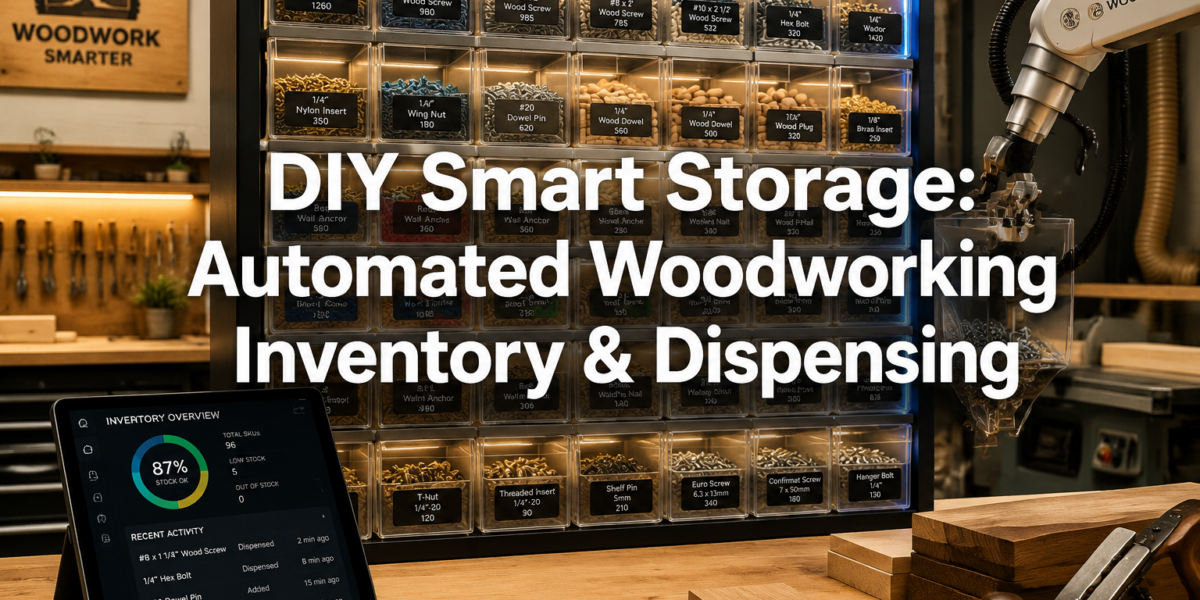
The elusive 3 AM search for a specific wood screw, only to discover the box is empty, is a common frustration that can derail an entire woodworking project. In the fast-paced workshop environment of 2026, wasted time due to disorganized consumables and unexpected stock shortages is no longer an acceptable norm. This article delves into an innovative solution: Building a DIY Smart Storage System for Woodworking Consumables: Automated Inventory and Dispensing. By integrating smart home technology and custom woodworking, enthusiasts can create a system that not only tracks inventory of fasteners, sandpaper, glues, and other vital supplies in real-time but also intelligently suggests reorder points, making supply management seamless and efficient.
Key Takeaways
- A DIY smart storage system uses sensors and microcontrollers to automate inventory tracking for woodworking consumables.
- The system provides real-time stock levels, reducing time spent searching for supplies and preventing unexpected shortages.
- Custom-built dispensing mechanisms can provide exact quantities of items like screws, enhancing workflow efficiency.
- Integration with smart home platforms allows for automated reordering suggestions and remote monitoring.
- This project combines woodworking craftsmanship with practical IoT applications, creating a highly functional and personalized workshop solution.
The Vision: Automated Inventory and Dispensing for a Smarter Workshop
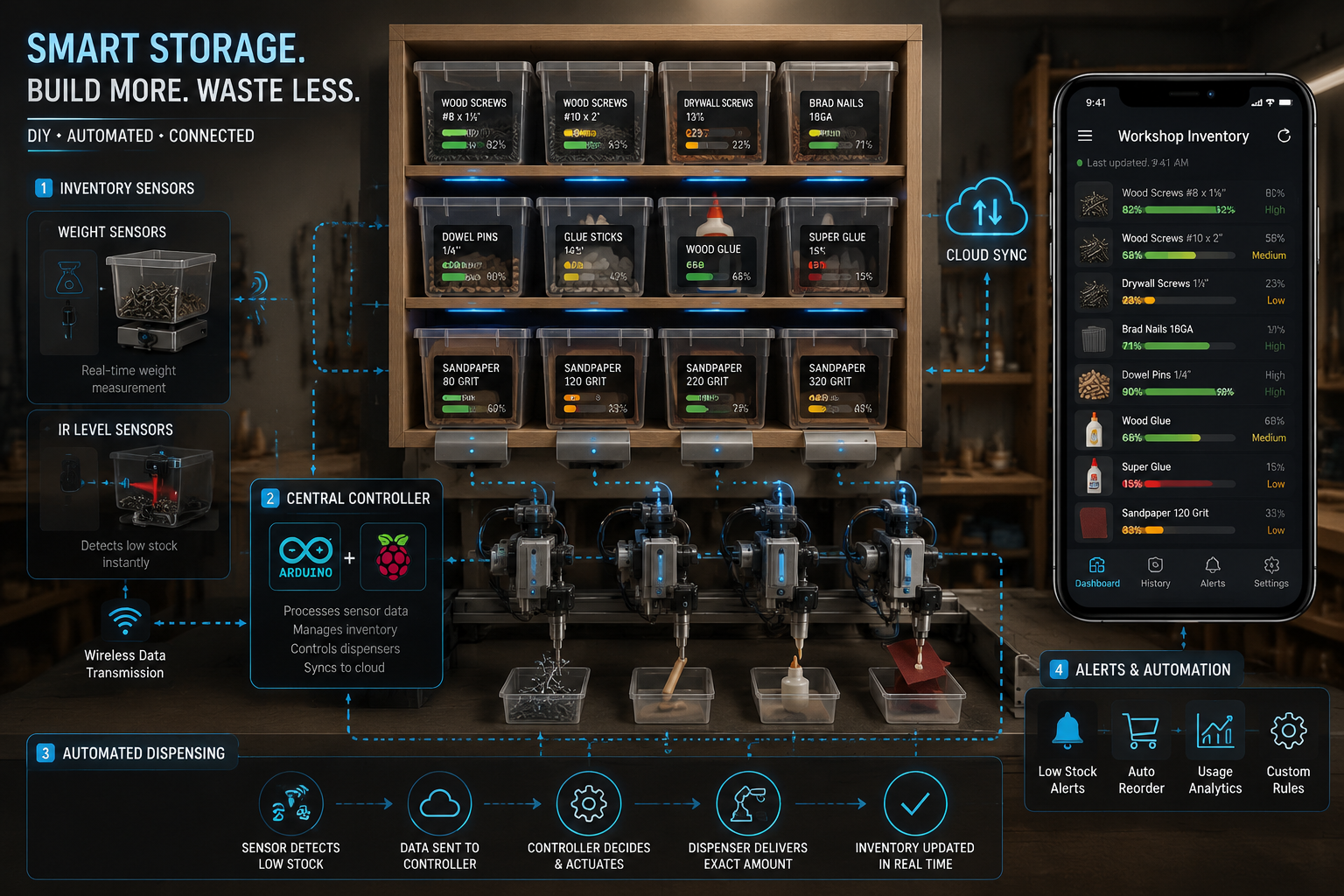 Imagine a woodworking shop where every consumable, from the smallest brad nail to various grits of sandpaper, is accounted for. No more frantic searches, no more mid-project runs to the hardware store. This is the promise of Building a DIY Smart Storage System for Woodworking Consumables: Automated Inventory and Dispensing. This system transforms a traditional storage cabinet into an intelligent hub, leveraging readily available technology to streamline your workflow and enhance productivity.
The core idea is to automate the tracking and, where feasible, the dispensing of small, frequently used items. Think about the sheer volume of different screws, nuts, bolts, washers, dowels, and sandpaper sheets a typical woodworker accumulates. Manually tracking these can be a monumental task, often neglected until a critical shortage arises. A smart system proactively manages this, offering peace of mind and more time for actual crafting.
Why Go Smart with Woodworking Consumables?
The benefits extend beyond mere convenience:
- Time Savings: Eliminate wasted minutes (or hours) searching for specific items. Real-time inventory means knowing exactly what you have and where it is.
- Cost Efficiency: Prevent over-purchasing or buying duplicates. The system identifies genuine needs, optimizing your budget.
- Reduced Frustration: Unexpected shortages during a project can be incredibly disruptive. Automated reorder suggestions mean you’re always prepared.
- Optimized Workflow: With dispensing mechanisms, you get the exact number of fasteners you need for a task, reducing clutter and improving focus.
- Data-Driven Decisions: Track usage patterns to better anticipate future needs, especially for high-volume projects.
This project is a perfect blend of traditional woodworking skills and modern technological integration. For those interested in enhancing their workshop’s efficiency through automation, this is a rewarding endeavor. Consider integrating this smart storage alongside other workshop upgrades like a DIY Smart Workshop Dust Collection System: Integrating IoT for a truly connected workspace.
| Component Category | Examples of Consumables | Why Smart Storage Helps |
|---|---|---|
| Fasteners | Screws, nails, bolts | Exact count dispensing, low stock alerts |
| Abrasives | Sandpaper, sanding discs | Usage tracking, grit-specific reorder |
| Adhesives | Wood glue, epoxy | Shelf-life monitoring (with manual input), stock level |
| Finishes | Oil, varnish, stain | Quantity monitoring for project planning |
| Small Hardware | Hinges, drawer slides | Inventory count, location tracking |
Pull Quote: “The modern woodworker isn’t just a craftsman; they’re an innovator, and a smart storage system is the ultimate expression of that duality.”
Core Components and Technologies for Your Smart Storage
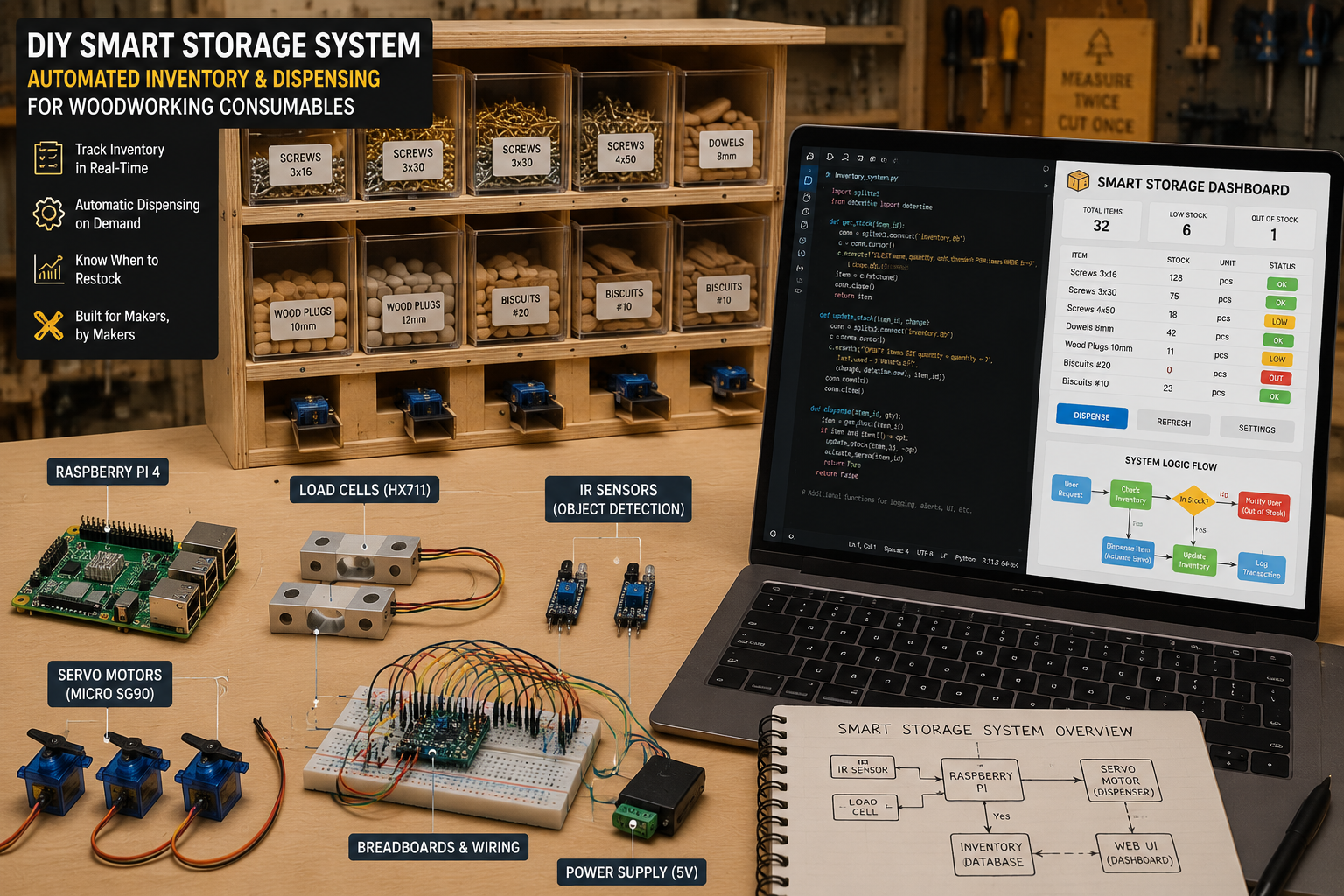 Building a DIY Smart Storage System for Woodworking Consumables: Automated Inventory and Dispensing relies on a combination of hardware and software. Understanding these core components is crucial for successful implementation. This is where the magic of IoT (Internet of Things) meets practical workshop needs.
Hardware Essentials
Microcontroller (The Brain):
- Raspberry Pi: A versatile single-board computer perfect for running the main logic, hosting a web interface, and managing multiple sensors. Its ability to run Linux offers significant flexibility.
- Arduino: Excellent for simpler sensor interfaces and controlling actuators (like servo motors for dispensing). Can be paired with a Raspberry Pi for more complex systems (Arduino handling sensors/actuators, Pi handling data/UI).
- Recommendation: Start with a Raspberry Pi for its all-in-one capabilities.
Sensors (The Eyes and Ears):
- Load Cells (Weight Sensors): Ideal for tracking the quantity of bulk items like screws or nails. By knowing the weight of an empty bin and the average weight per item, you can calculate inventory.
- Example: HX711 Amplifier with small load cells beneath each storage bin.
- IR (Infrared) or Ultrasonic Sensors: Useful for detecting the presence or absence of larger items (e.g., a stack of sandpaper sheets, a bottle of glue).
- Magnetic Reed Switches: For tracking whether a storage bin or drawer is open or closed, indicating access.
- RFID/NFC Readers: For higher-value consumables or tools, attaching RFID tags can provide precise item-level tracking when items are removed or returned.
- Load Cells (Weight Sensors): Ideal for tracking the quantity of bulk items like screws or nails. By knowing the weight of an empty bin and the average weight per item, you can calculate inventory.
Actuators (The Hands – for Dispensing):
- Servo Motors: Excellent for small, controlled movements to open/close gates for dispensing single fasteners or small batches.
- Stepper Motors: For more precise, rotational control, potentially for a rotating carousel dispensing system or an auger for bulk items.
- Vibrating Feeders: Can be considered for singulating and dispensing very small, difficult-to-handle items.
Connectivity:
- Wi-Fi Module: Essential for the microcontroller to communicate with your home network, send data to a server, or receive commands from a smartphone app.
- Ethernet Port: Available on most Raspberry Pi models for a more stable wired connection.
Power Supply:
- Reliable 5V or 12V power supply for your microcontroller and sensors. Consider a UPS for critical data.
Software and Programming
Operating System:
- Raspberry Pi OS (formerly Raspbian): Linux-based, user-friendly, and comes with many pre-installed tools.
Programming Language:
- Python: Widely used for IoT projects due to its simplicity, extensive libraries (GPIO control, web frameworks), and large community support.
Database:
- SQLite: A lightweight, file-based database perfect for storing inventory data directly on the Raspberry Pi.
- MariaDB/MySQL: For more complex systems or if you plan to integrate with a larger home automation setup.
User Interface (UI):
- Web-based Dashboard: Using Python frameworks like Flask or Django, you can create a simple local webpage accessible from any device on your network. This dashboard would display inventory levels, reorder suggestions, and allow manual adjustments.
- Mobile App (Optional): For advanced users, developing a dedicated mobile app (using Flutter, React Native, or similar) offers push notifications and a more polished experience.
- MQTT Broker: For seamless communication between devices and your dashboard, especially if integrating with other smart home elements.
Smart Home Integration:
- Home Assistant: A powerful open-source home automation platform that can integrate your DIY smart storage system, allowing it to communicate with other smart devices (e.g., triggering a smart light when stock is low). See our guide on DIY Smart Home Integration with Custom Woodwork.
Design Considerations for the Physical Storage
The woodworking aspect of this project is just as crucial. The physical bins, drawers, and dispensing mechanisms need to be robust, precise, and easily integrated with the electronics. Consider modular designs, similar to those for DIY Modular Desk Organizers, to allow for future expansion and reconfiguration.
- Modular Bins: Design individual wooden or 3D-printed bins for each consumable, allowing for easy removal and refilling.
- Dispensing Mechanism Housing: Create custom wooden enclosures for servo motors and dispensing gates. Precision is key here to avoid jams.
- Wiring Channels: Plan for discrete channels to route sensor wires and power cables, maintaining a clean and safe aesthetic.
- Display Integration: If you opt for a small LCD display on the unit, design a wooden bezel for a professional finish.
Building and Integrating Your Smart Storage System
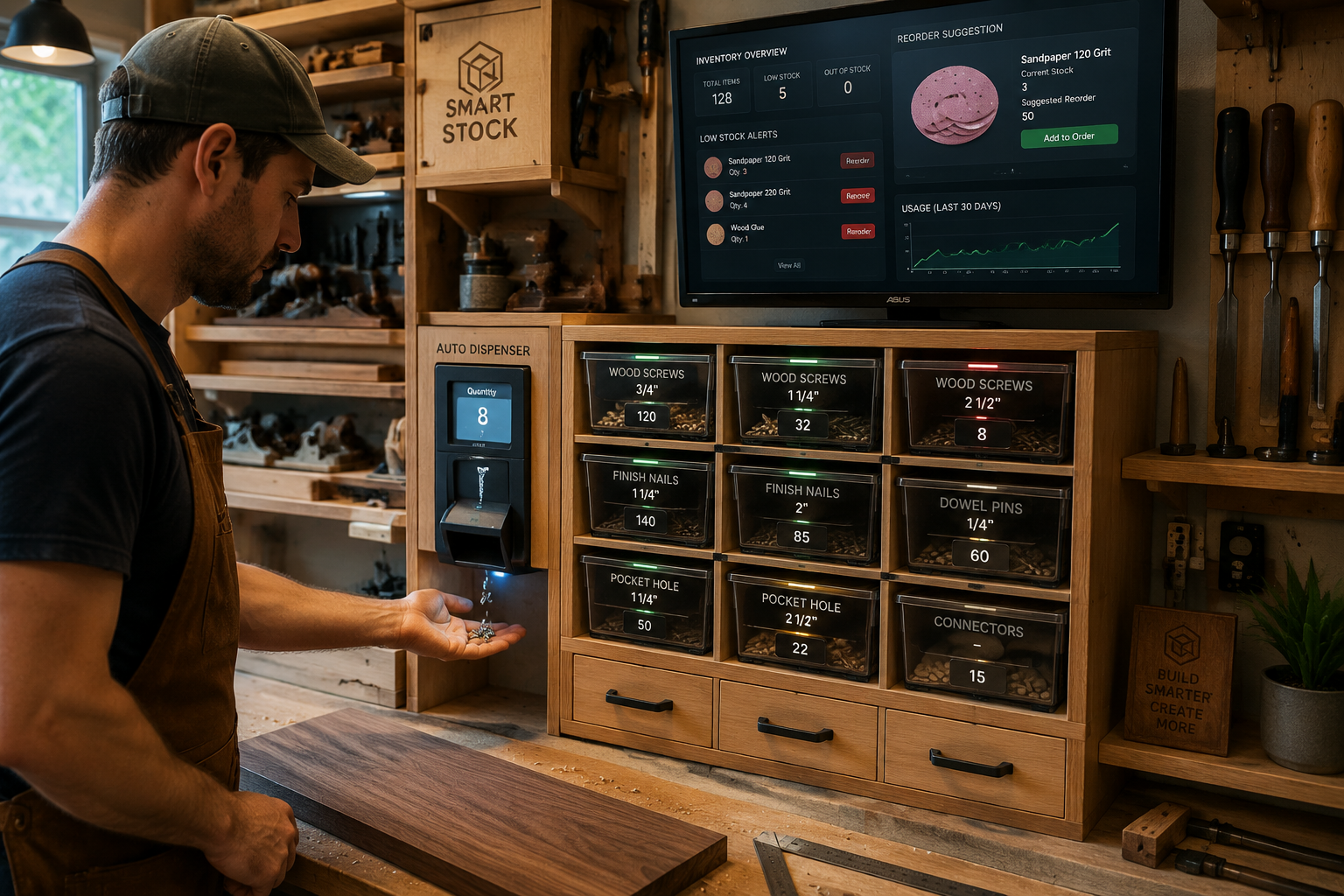 The journey of Building a DIY Smart Storage System for Woodworking Consumables: Automated Inventory and Dispensing is a rewarding process that combines fabrication and programming. Here’s a step-by-step approach to bring your smart workshop vision to life in 2026.
Phase 1: Planning and Design
- Inventory Assessment: Categorize your woodworking consumables. Which items are high-volume? Which are critical? This helps determine what needs automated tracking/dispensing.
- System Layout:
- Decide on the physical structure: wall-mounted shelves, drawer inserts, a dedicated cabinet, or even integrating into a Custom Wood Workbench.
- Sketch out bin sizes and dispenser locations.
- Plan for power distribution and cable management.
- Component Selection: Based on your assessment, choose specific microcontrollers, sensors, and actuators. Source these online from electronics suppliers.
- Software Flowchart: Map out how data will flow: Sensor -> Microcontroller -> Database -> UI -> Alert/Dispense. This helps in coding.
Phase 2: Woodworking and Fabrication
- Build the Physical Structure: Construct the housing for your smart storage system. Precision is paramount, especially for parts that will house dispensing mechanisms.
- Use durable materials. Plywood or MDF are excellent choices for cabinets and bins.
- Ensure easy access for maintenance and refilling.
- Craft Individual Bins/Drawers:
- For load cell-based tracking, ensure each bin rests evenly on its sensor.
- For dispensing units, create chutes or gates that allow consumables to flow smoothly without jamming.
- Integrate Dispensing Mechanisms: Carefully mount servo or stepper motors and connect them to the dispensing gates. Test the mechanical action manually.
Phase 3: Electronics Assembly and Wiring
- Mount Microcontroller: Secure your Raspberry Pi or Arduino within the system, ensuring good ventilation.
- Connect Sensors:
- Load Cells: Wire the HX711 amplifier to the load cell and then to the microcontroller. Calibrate each load cell by adding known weights and recording readings. This forms the basis of your inventory calculation.
- IR/Ultrasonic: Position these sensors to detect item presence.
- Connect Actuators: Wire servo/stepper motors to the microcontroller. Use motor drivers if necessary, especially for stepper motors or multiple servos.
- Power Distribution: Create a clean power distribution system to provide consistent voltage to all components.
Phase 4: Programming and Software Setup
- Set Up Microcontroller: Install the chosen OS (e.g., Raspberry Pi OS).
- Write Sensor Reading Scripts: Develop Python scripts to read data from each sensor. For load cells, this involves converting raw readings into meaningful weight values and then into item counts.
- Tip: Implement robust error handling for sensor readings.
- Develop Inventory Logic:
- Database Integration: Create a database (e.g., SQLite) to store item names, current stock, reorder thresholds, and average item weight.
- Reorder Calculation: Implement logic that compares current stock to a predefined minimum threshold.
- Usage Tracking: Optionally, track the rate of consumption to predict future needs.
- Create Dispensing Control: Write functions to control the servo/stepper motors to dispense the desired number of items. This might involve a “dispense one” button or a command to dispense a specific quantity.
- Build the User Interface:
- Develop a web-based dashboard using Flask or Django. This should display real-time inventory, reorder suggestions, and allow manual inventory adjustments.
- Consider adding buttons to trigger dispensing actions.
- Implement Alerts: Configure email or push notifications (via a service like Pushover or integration with Home Assistant) for low stock levels.
Phase 5: Testing and Calibration
- Individual Component Testing: Test each sensor and actuator independently.
- System Integration Testing: Test the entire system end-to-end. Add items, remove items, trigger dispensing, and verify that the inventory updates correctly and alerts function as expected.
- Calibration Refinement: Fine-tune load cell calibration, especially for different types of fasteners or materials.
- User Acceptance Testing: Get feedback from other woodworkers if possible.
Phase 6: Refinement and Upgrades
- Wireless Dispensing: Explore adding a small wireless remote or voice control (via Home Assistant) for dispensing.
- Integration with Online Stores: For advanced users, potentially link the reorder suggestions to a preferred online hardware store’s API (if available) to generate a shopping list.
- Material Recognition: Explore using small cameras with object recognition for certain consumables, although this adds significant complexity.
- Physical Enhancements: Consider adding transparent windows to bins for visual confirmation, or LED indicators for low stock.
This iterative process ensures a robust and reliable smart storage system that genuinely enhances your woodworking experience.
Conclusion
The journey of Building a DIY Smart Storage System for Woodworking Consumables: Automated Inventory and Dispensing is more than just a tech project; it’s about reclaiming valuable workshop time and eliminating common frustrations. By thoughtfully combining woodworking craftsmanship with accessible IoT technology, you can create an environment where your consumables are always organized, accounted for, and ready when you need them.
This system empowers you to spend less time searching and more time creating. The ability to monitor stock levels in real-time, receive automated reorder suggestions, and even dispense specific quantities of fasteners streamlines your workflow in ways that traditional storage simply cannot. Moreover, it’s a fantastic learning opportunity, bridging the gap between physical fabrication and digital intelligence.
As you embark on this project in 2026, remember that customization is key. Tailor the system to your specific needs, the types of consumables you use most, and the layout of your workshop. Start with the core components—microcontroller, sensors, and basic inventory tracking—and then expand with dispensing mechanisms and smart home integrations as you gain confidence. The satisfaction of a perfectly organized, intelligently managed workshop is an invaluable reward that will elevate your woodworking projects for years to come.
Actionable Next Steps:
- Audit Your Consumables: Make a detailed list of all your small woodworking supplies and identify which ones cause the most frustration when missing or disorganized.
- Research Components: Familiarize yourself with Raspberry Pi, Arduino, various sensors (load cells, IR), and servo motors. Watch online tutorials on basic setup.
- Sketch Your Design: Plan the physical layout of your smart storage. Consider integrating it with existing modular workshop solutions or a new cabinet.
- Start Small: Begin by automating inventory for just one or two types of fasteners to test your system before scaling up.
- Join a Community: Engage with online forums or local maker spaces for tips, troubleshooting, and inspiration from others building similar projects.
References
- Fisher, H. (2020). The Makerspace Workbench: Tools, Projects, and Techniques for the Modern Workshop. McGraw-Hill Education.
- Monk, S. (2016). Programming the Raspberry Pi: Getting Started with Python. McGraw-Hill Education.
- O’Reilly, T. (2005). What Is Web 2.0: Design Patterns and Business Models for the Next Generation of Software. O’Reilly Media.
SEO Meta Title: DIY Smart Storage for Woodworking: Auto Inventory & Dispensing SEO Meta Description: Build a DIY smart storage system for woodworking consumables in 2026. Automate inventory, track supplies, and dispense items with IoT tech.