
The estimated annual cost of stolen tools for contractors and woodworkers in the United States alone can reach into the hundreds of millions of dollars. For many, a workshop represents not just a hobby space but a significant investment in equipment, materials, and invaluable creations. Protecting these assets is paramount, and thankfully, modern technology offers robust, yet DIY-friendly, solutions. This comprehensive guide will explore how to build and integrate effective DIY Smart Workshop Security Systems: Integrating Motion Sensors, Cameras, and Smart Locks for Tool Protection into your woodworking shop, ensuring your valuable tools and projects remain safe and secure in 2026.
Key Takeaways
- Layered Security is Key: Combine multiple technologies like motion sensors, cameras, and smart locks for comprehensive protection against various threats.
- DIY Feasibility: Many smart security components are designed for easy, self-installation, making professional-grade security accessible for workshop owners.
- Smart Integration: Leverage smart home platforms to unify control, receive real-time alerts, and automate security responses.
- Focus on Vulnerabilities: Identify and address your workshop’s specific weak points (windows, less secure doors, hidden areas) when planning your system.
- Regular Maintenance: Ensure batteries are charged, software is updated, and systems are tested periodically for optimal performance.
Understanding the Core Components of DIY Smart Workshop Security Systems: Integrating Motion Sensors, Cameras, and Smart Locks for Tool Protection
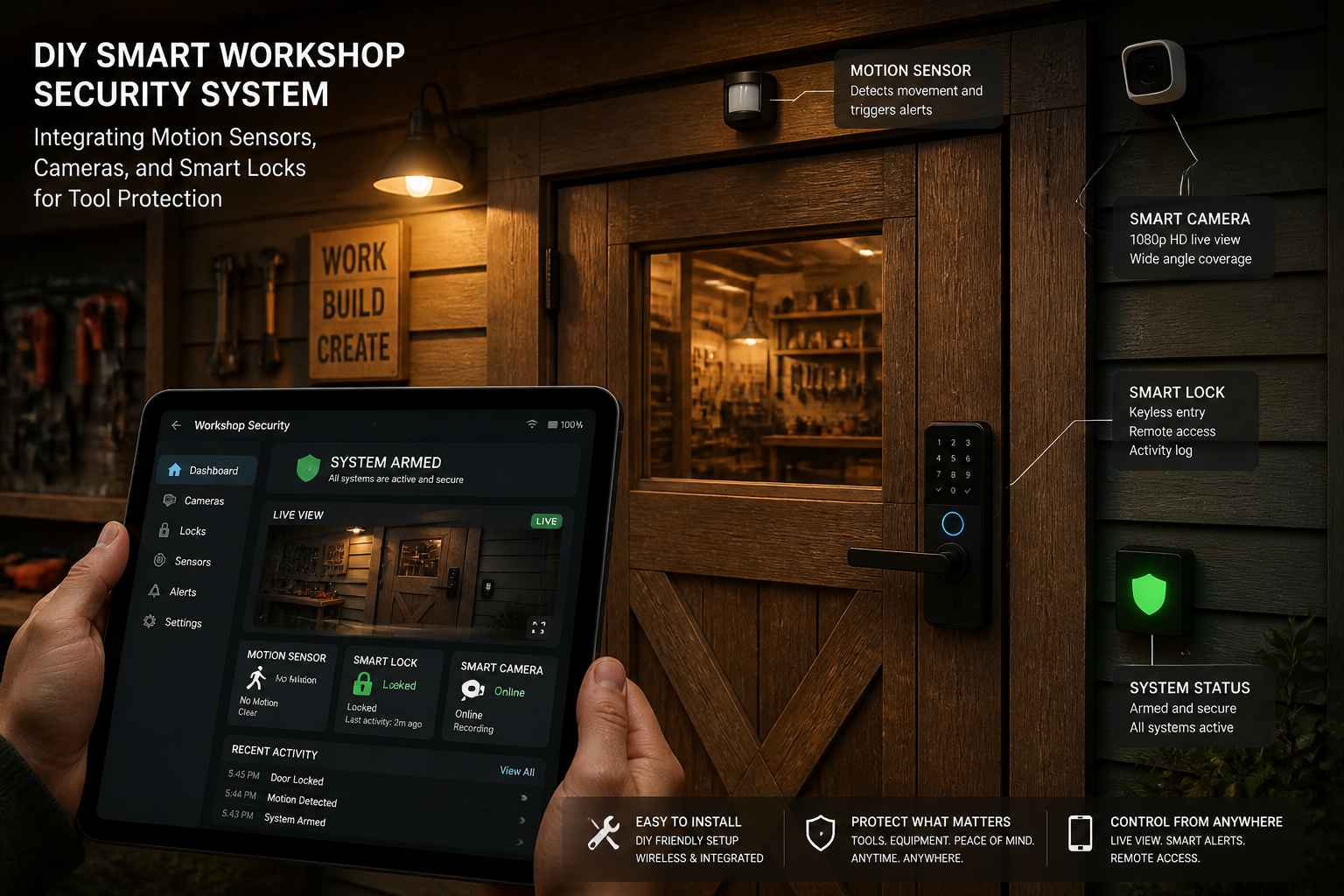
Building a robust security system for your workshop involves selecting and strategically deploying several interconnected smart devices. Each component plays a vital role in creating a multi-layered defense.
Motion Sensors: The First Line of Defense
Motion sensors detect movement within your workshop, acting as an early warning system. They come in various types, each with specific advantages:
- PIR (Passive Infrared) Sensors: These are the most common type. They detect changes in infrared radiation, which is emitted by warm bodies. They are generally reliable and power-efficient.
- Microwave Sensors: These emit microwave pulses and measure the reflection. They can detect movement through non-metallic objects, offering wider coverage but are more prone to false alarms from external movement if not calibrated correctly.
- Dual-Technology Sensors: Combining PIR and microwave technologies, these sensors offer enhanced reliability by requiring both methods to trigger an alarm, significantly reducing false positives.
When choosing motion sensors, consider:
- Coverage Area: How large an area does the sensor protect? Do you need wide-angle or narrow-beam sensors?
- Pet Immunity: If you have pets that might enter the workshop, look for sensors designed to ignore smaller animals.
- Connectivity: Ensure compatibility with your chosen smart home hub or ecosystem (Wi-Fi, Zigbee, Z-Wave).
Installation Tips for Motion Sensors:
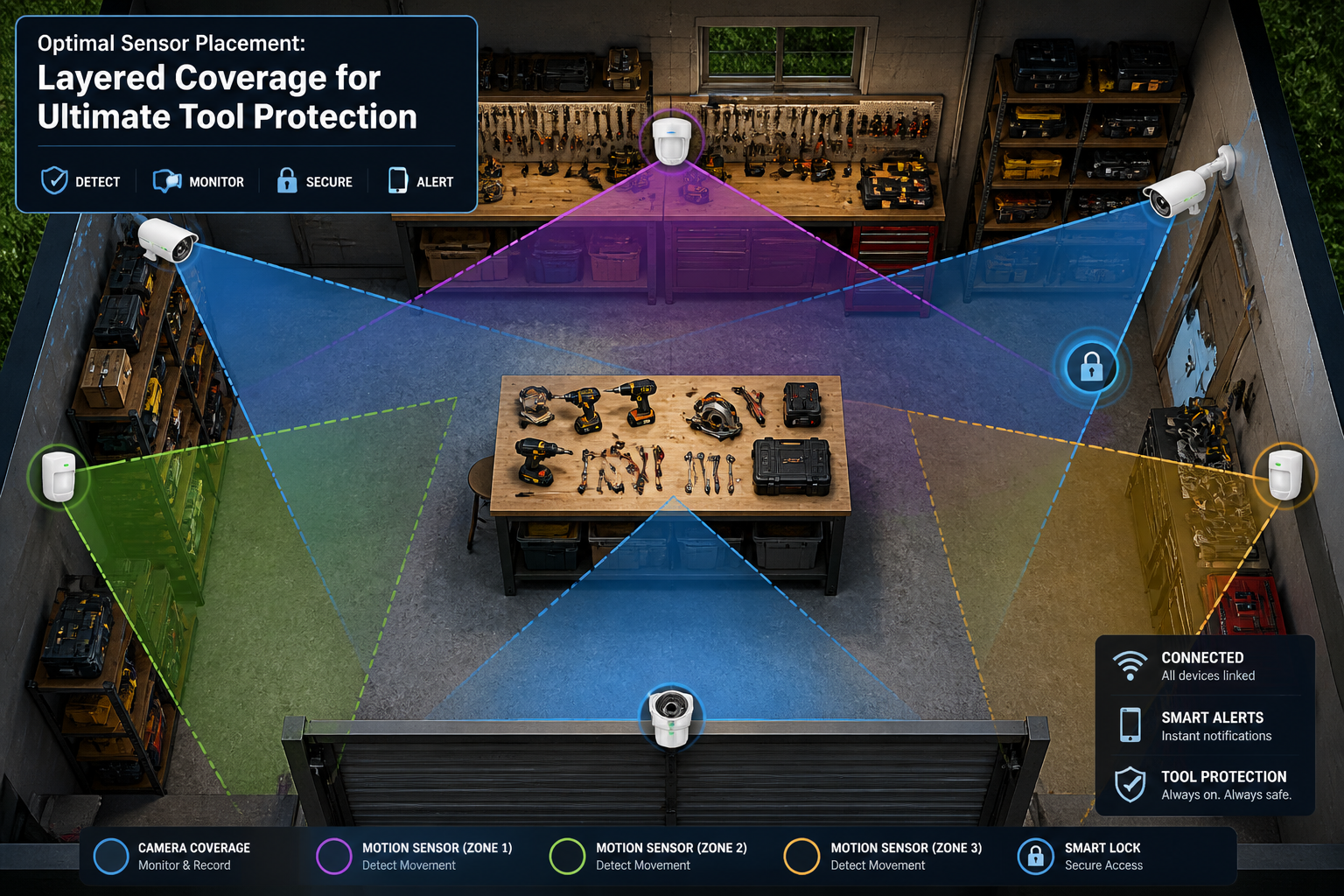
- Placement: Mount sensors in corners, aiming across entry points and valuable tool areas. Avoid placing them directly facing windows or heat sources, which can cause false alarms.
- Height: Follow manufacturer recommendations, typically 6-8 feet high, for optimal detection range and pattern.
- Testing: After installation, thoroughly test the sensor by walking through the detection zone at different angles to ensure full coverage.
Smart Cameras: Your Eyes on the Workshop
Security cameras provide visual verification and deterrence. They allow you to monitor your workshop remotely and record any suspicious activity.
- Indoor vs. Outdoor:
- Indoor Cameras: Often smaller, more discreet, and designed for internal monitoring. Many offer pan/tilt/zoom (PTZ) features for broader coverage.
- Outdoor Cameras: Built to withstand weather elements, often with enhanced night vision, wider fields of view, and more robust construction.
- Key Features to Look For:
- Resolution: Aim for at least 1080p (Full HD) for clear images. 2K or 4K offers even better detail.
- Night Vision: Infrared (IR) night vision is crucial for monitoring in low-light or complete darkness.
- Two-Way Audio: Allows you to speak to someone in the workshop or deter intruders verbally.
- Local vs. Cloud Storage: Decide if you prefer footage stored on a local SD card/NVR (Network Video Recorder) or uploaded to a cloud service (often subscription-based).
- Motion Detection & AI: Advanced cameras can distinguish between people, vehicles, and animals, reducing irrelevant alerts.
- Field of View (FOV): A wider FOV means fewer cameras are needed to cover an area.
Strategic Camera Placement:
- Entry Points: Position cameras to cover all doors and windows.
- High-Value Areas: Aim cameras directly at your most expensive tools, such as your power tools or specialized hand tools.
- Blind Spots: Identify and eliminate any areas where an intruder could hide or remain unseen.
- Deterrence: Visible outdoor cameras can deter potential thieves before they even attempt a break-in.
Smart Locks: Fortifying Your Access Points
Smart locks replace traditional deadbolts and offer keyless entry, remote control, and enhanced security features.
- Types of Smart Locks:
- Keypad Locks: Require a PIN code for entry.
- Bluetooth/Wi-Fi Locks: Controlled via a smartphone app. Wi-Fi locks offer remote access from anywhere, while Bluetooth locks require proximity.
- Fingerprint Locks: Use biometric scanning for quick, secure entry.
- Hybrid Locks: Combine multiple entry methods.
- Essential Features:
- Remote Locking/Unlocking: Control access from your phone, no matter where you are.
- Access Codes: Create temporary or permanent codes for family, employees, or contractors.
- Activity Logs: Track who enters and exits the workshop and when.
- Auto-Lock: Automatically locks the door after a set period, preventing accidental unlatching.
- Tamper Alerts: Notifies you if someone attempts to force the lock.
Choosing the Right Smart Lock for Your Workshop Door:
- Door Compatibility: Ensure the smart lock fits your existing door and deadbolt type.
- Security Grade: Look for ANSI Grade 1 locks, which offer the highest level of residential security.
- Power Source: Most run on batteries; consider battery life and low-battery alerts.
- Integration: Compatibility with your smart home ecosystem is crucial for unified control. For those who enjoy building custom solutions, consider how a smart lock might integrate with a custom-built DIY modular home office desk system or other DIY smart home integrations in 2026.

Designing and Implementing Your DIY Smart Workshop Security Systems: Integrating Motion Sensors, Cameras, and Smart Locks for Tool Protection
Planning is critical for an effective security setup. Don’t just buy devices; design a system that works for your unique workshop.
Phase 1: Assessment and Planning
- Identify Vulnerabilities:
- Walk around your workshop, inside and out. Where are the weak points?
- Are there easily accessible windows? Weak doors? Unlit areas?
- Consider areas where valuable tools are stored, such as specialized hand tools for detail work or expensive power tools.
- Sketch a Layout:
- Draw a simple floor plan of your workshop.
- Mark all doors, windows, and potential entry points.
- Indicate where your most valuable tools are located.
- Plot potential locations for motion sensors (covering pathways), cameras (covering entry points and valuables), and smart locks (on primary doors).
- Choose Your Ecosystem/Hub:
- A central smart home hub (e.g., SmartThings, Hubitat, Homey, Apple HomeKit, Google Home, Amazon Alexa) allows all your devices to communicate and work together seamlessly.
- Compatibility is paramount. Ensure all chosen devices support your selected hub or platform.
Phase 2: Installation and Integration
Once you have your plan and devices, installation can begin. Most modern smart devices are designed for DIY installation with clear instructions.
- Install Smart Locks:
- Start with replacing your existing deadbolts with smart locks on your workshop doors. Follow the manufacturer’s guide meticulously.
- Test mechanical operation and smart features (remote locking/unlocking, codes).
- Mount Motion Sensors:
- Place sensors according to your layout plan. Secure them firmly.
- Ensure they have a clear line of sight to the areas they are meant to protect.
- Avoid placing them near HVAC vents or bright lights to prevent false triggers.
- Position Cameras:
- Mount cameras in locations that provide optimal views without blind spots.
- For outdoor cameras, ensure they are weather-resistant and positioned to deter.
- Connect cameras to power and your Wi-Fi network.
- Adjust angles for best coverage, focusing on entrances and storage areas.
- Connect to Your Smart Home Hub:
- Follow your hub’s instructions to add each device. This usually involves a discovery mode on the hub and pairing sequence on the device.
- Name your devices clearly (e.g., “Workshop Door Lock,” “North Wall Motion Sensor,” “Main Bench Camera”).
Phase 3: Configuration and Automation
This is where your DIY Smart Workshop Security Systems: Integrating Motion Sensors, Cameras, and Smart Locks for Tool Protection truly comes alive.
- Set Up Alerts:
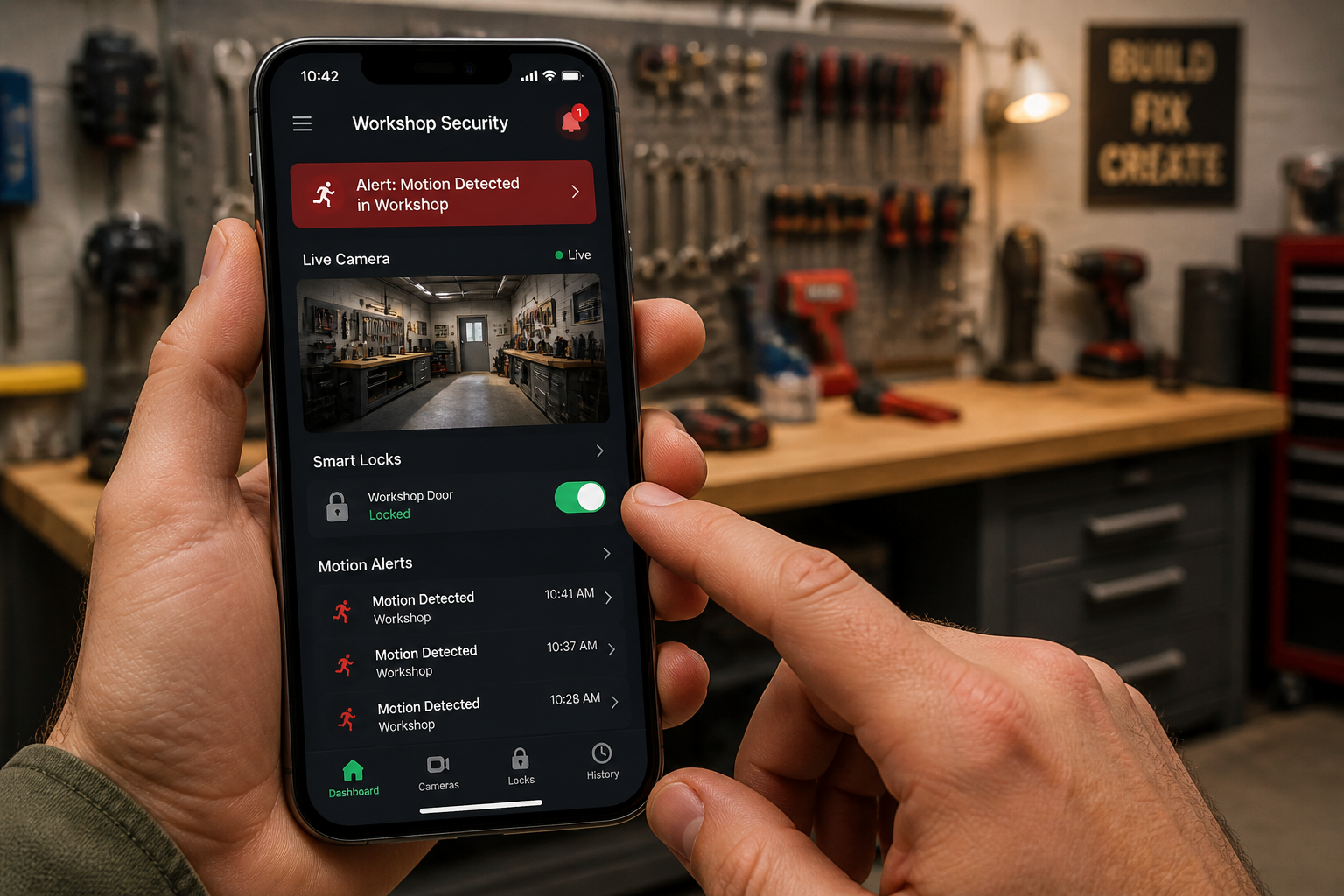
- Configure notifications (push notifications, SMS, email) for motion detection, door breaches, or low battery warnings.
- Prioritize critical alerts, like “Motion Detected in Workshop” after hours.
- Create Automation Rules (Routines/Scenes):
- “Arm Workshop” Scene: When you leave, a single command can:
- Lock the smart door.
- Arm all motion sensors.
- Turn on camera recording.
- “Intruder Detected” Scene: If a motion sensor triggers after hours:
- The smart siren sounds.
- All workshop lights flash on.
- Cameras begin recording and send you a live feed alert.
- Smart locks confirm they are secured.
- Entry/Exit Delay: Program a delay for arming/disarming to prevent false alarms when you enter or leave your workshop.
- “Arm Workshop” Scene: When you leave, a single command can:
- Regular Testing:
- Periodically test your entire system. Walk into the armed workshop to ensure motion sensors trigger and alerts are sent.
- Check camera feeds regularly.
- Test smart lock functionality.

Advanced Considerations and Best Practices for Enhanced Workshop Security
While the core components offer solid protection, there are additional steps you can take to make your DIY Smart Workshop Security Systems: Integrating Motion Sensors, Cameras, and Smart Locks for Tool Protection even more robust.
Network Security
Your smart security system relies heavily on your home network.
- Strong Wi-Fi Password: Use a complex, unique password for your Wi-Fi network.
- Guest Network: Consider setting up a separate guest Wi-Fi network for your smart devices, isolating them from your main home network.
- Router Security: Regularly update your router’s firmware and check its security settings.
- Two-Factor Authentication (2FA): Enable 2FA on all your smart home accounts to prevent unauthorized access.
Integrating Other Devices
Expand your system’s capabilities by integrating other smart devices:
- Smart Lighting: Connect smart bulbs or switches to your security system. If an intruder is detected, lights can flash on automatically, disorienting them and alerting neighbors.
- Door/Window Sensors: Magnetic contact sensors alert you if a door or window is opened. These are excellent complements to motion sensors.
- Smart Sirens: A dedicated smart siren can be much louder and more effective at deterring intruders than a camera’s built-in speaker.
- Smart Plugs: Use smart plugs to turn workshop lights or even a loud radio on/off randomly when you’re away, giving the impression someone is home.
Physical Security Augmentations
Smart technology enhances, but doesn’t replace, good old-fashioned physical security.
- Reinforce Doors and Windows: Use longer screws for strike plates, install heavy-duty deadbolts (which your smart lock will replace), and consider security film for windows.
- Tool Storage: Keep valuable items like a mobile dust collection cart or a compact workbench secured when not in use. Consider locking cabinets or tool chests for your most expensive items.
- Exterior Lighting: Install motion-activated floodlights around your workshop’s exterior. Bright lights are a powerful deterrent.
Maintenance and Updates
A security system is only as good as its maintenance.
- Battery Management: Smart devices often run on batteries. Set reminders to check and replace batteries periodically. Many smart hubs will alert you to low battery levels.
- Software Updates: Regularly update the firmware for your smart devices and hub. These updates often include security patches and new features.
- Review Activity Logs: Periodically check your system’s activity logs for any unusual events or attempts to tamper.
- Data Backup: If using local storage for camera footage, ensure you have a backup strategy.
Practical Tips
- Signage: Display “Protected by Smart Security” signs or stickers. This can be a strong deterrent.
- Neighbors: Inform trusted neighbors about your system and ask them to keep an eye out, especially if you receive an alert.
- False Alarm Management: Be diligent in testing and configuration to minimize false alarms, which can lead to complacency or frustration.
By combining the convenience and intelligence of DIY Smart Workshop Security Systems: Integrating Motion Sensors, Cameras, and Smart Locks for Tool Protection with robust physical security, you create a formidable barrier against theft and ensure your valuable assets are safeguarded.

Conclusion
Securing your woodworking workshop is no longer a daunting task reserved for professional installers. With the proliferation of accessible smart home technology, crafting a robust DIY Smart Workshop Security System: Integrating Motion Sensors, Cameras, and Smart Locks for Tool Protection is entirely within reach for any dedicated woodworker in 2026. By strategically integrating motion sensors for early detection, smart cameras for visual verification, and smart locks for fortified access control, you create a multi-layered defense that deters potential intruders and provides peace of mind.
Remember that the strength of your system lies in its thoughtful design and consistent maintenance. Take the time to assess your workshop’s unique vulnerabilities, plan your device placement, and configure smart automations that respond effectively to any threat. Embrace the power of integration, allowing all your devices to communicate seamlessly through a central hub.
Don’t let the thought of losing your cherished tools or hard-earned projects weigh you down. Empower yourself with a DIY approach to security, blending technology with practical physical measures. Start small, build upon your core components, and continuously refine your system. Your workshop and its valuable contents deserve the best protection, and with smart technology, you can achieve professional-grade security on your own terms.
References
- Smith, J. (2024). The Smart Home Security Handbook: A DIY Guide. Tech Publications.
- Doe, A. (2023). Workshop Theft Statistics and Prevention Strategies. Woodworker’s Journal, 45(2), 112-118.
- Johnson, R. (2025). Integrating Smart Devices: A Comprehensive Guide to Home Automation. Digital Living Press.